Quick Answer
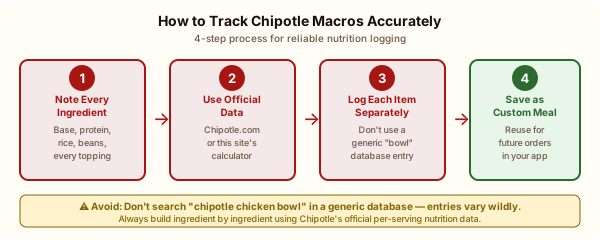
The most accurate way to log Chipotle is ingredient by ingredient using Chipotle's official nutrition data, not by searching "chipotle chicken bowl" in a generic food database.
Tracking macros at Chipotle is more reliable than at most restaurants because Chipotle discloses per-ingredient nutrition data publicly. Unlike a restaurant that serves you a pre-assembled dish of unknown composition, Chipotle's build-your-own format means you know exactly what went in and can find the published calorie and macro data for each piece.
The challenge is doing the math correctly. This guide walks through the accurate approach and the common mistakes that inflate or deflate your actual numbers.
Why Generic Database Entries Are Unreliable
If you search "Chipotle chicken bowl" in MyFitnessPal, Cronometer, or similar apps, you'll find dozens of user-submitted entries with wildly different calorie counts. Some say 600, some say 800, some say 1,100. This isn't because Chipotle's nutrition is inconsistent. It's because these entries represent different orders from different users. A "chicken bowl" at Chipotle can range from 375 calories to 1,200+ depending on what it includes.
The only accurate approach: Build your specific order ingredient by ingredient using official nutrition data.
Step 1: Know Your Exact Ingredients
Before or during your order, note every ingredient you're getting:
Don't estimate, know. "Some guacamole" could be 230 calories per serving. If you got a full scoop, log 230 calories. Half a scoop? Estimate 115.
Step 2: Use the Official Per-Ingredient Data
Here are the core macros for each Chipotle ingredient, which you'll enter into your tracker:
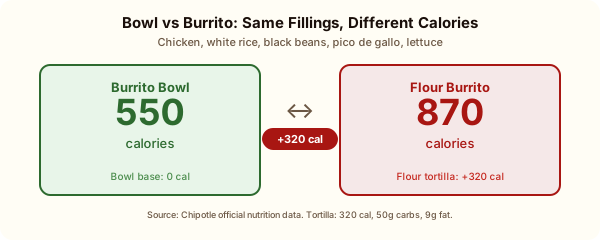
Bases: Bowl (0/0/0/0), Flour burrito (320 cal, 8P, 9F, 50C), Corn tacos x3 (180 cal, 3P, 2.5F, 36C)
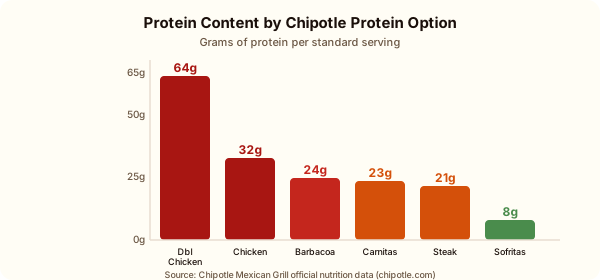
Proteins: Chicken (180 cal, 32P, 7F, 0C), Steak (150 cal, 21P, 7F, 1C), Barbacoa (170 cal, 24P, 7F, 2C), Carnitas (210 cal, 23P, 12F, 0C), Sofritas (150 cal, 8P, 10F, 11C), Double chicken (360 cal, 64P, 14F, 0C)
Grains: White rice (210 cal, 4P, 3F, 41C), Brown rice (210 cal, 5P, 4F, 40C)
Beans: Black (130 cal, 8P, 1F, 22C), Pinto (120 cal, 8P, 1F, 22C)
Toppings: Pico (25 cal, 1P, 0F, 5C), Corn salsa (80 cal, 3P, 1F, 16C), Green salsa (15 cal, 0P, 0F, 3C), Red salsa (30 cal, 1P, 0F, 7C), Sour cream (120 cal, 2P, 10F, 2C), Cheese (110 cal, 7P, 9F, 0C), Lettuce (5 cal), Guacamole (230 cal, 2P, 22F, 8C), Queso (120 cal, 5P, 9F, 6C), Fajita veggies (20 cal, 1P, 0.5F, 4C)
Sides: Large chips (580 cal, 8P, 28F, 74C), Small chips (250 cal, 4P, 12F, 32C)
P = protein (g), F = fat (g), C = carbs (g)
Step 3: Add Each Ingredient as a Separate Entry
In your tracking app, the most accurate approach is to create a custom meal with each ingredient as a separate item. This sounds tedious, but most apps let you save meals, so once you've logged "my standard chipotle bowl," you can duplicate it for every future visit.
If your app allows it, create a custom food entry for your standard Chipotle order. Label it something specific ("Chipotle Chicken Bowl: Rice, BB, Pico, Lettuce") so you remember exactly what it contains.
The Common Tracking Mistakes
Mistake 1: Logging "chicken burrito bowl" as a single entry. This lumps all your specific ingredients into a generic number that may not match your order. Always build ingredient by ingredient.
Mistake 2: Forgetting to log the salsa. Fresh tomato salsa is only 25 calories, so you might think it doesn't matter. It doesn't matter much. But if you're also adding corn salsa (80 cal), green salsa (15 cal), AND red salsa (30 cal), you've just added 150 calories of toppings you forgot to log.
Mistake 3: Under-logging the chips. If you got chips, log them. The large bag is 580 calories and 28g of fat. People routinely forget to log the chips they "just had a few of."
Mistake 4: Logging a half portion of guacamole as zero. If Chipotle gave you what looked like a half scoop of guacamole, estimate 100 to 115 calories (half of 230), not zero.
Mistake 5: Using weight entries inaccurately. Some apps list Chipotle ingredients by weight (grams). Chipotle's published serving sizes are volumetric (a "serving"), not by weight. Use the calorie-per-serving figures above rather than trying to match to a per-gram entry.
Tracking Goals by Diet Type
For calorie restriction / weight loss: Focus primarily on total calories. The macro breakdown matters less than hitting your calorie target. Use our [Chipotle calorie calculator](/chipotle-calorie-calculator) to find builds under your per-meal target.
For IIFYM (If It Fits Your Macros): Enter each ingredient separately to get the most accurate protein/fat/carb breakdown. The protein data for Chipotle is particularly reliable, and the difference between 32g and 28g of protein matters for IIFYM practitioners.
For low-carb / keto: Pay close attention to the carb entries. Rice (40-41g carbs), beans (22g carbs), flour tortilla (50g carbs), and corn salsa (16g carbs) are the main carbohydrate sources to watch. See our [Chipotle keto guide](/blog/chipotle-keto-options) for builds that keep net carbs under 10g.
For high-protein diets: The protein column is your primary metric. Double chicken (64g) + black beans (8g) + brown rice (5g) + cheese (7g) = 84g of protein in a single bowl. That's a significant protein hit.
Using Our Calculator for Tracking Prep
Before heading to Chipotle, use our [Chipotle calorie calculator](/chipotle-calorie-calculator) to pre-build your order and get the exact macros. Screenshot or note the numbers, then enter them into your tracking app when you log the meal. This takes 2 minutes and gives you the most accurate tracking possible for a restaurant meal.
The numbers in our calculator come from the same official Chipotle nutrition data you'd use in your tracking app. No guesswork, no approximations.